


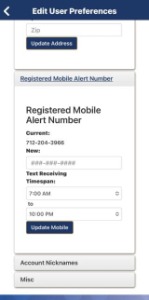
Text Banking is using your smart phone to text a secure number commands to instantly see your account information. You will need to be signed up for our Online Banking to access this service AND your mobile phone number must be registered to receive SMS texts. To register your mobile number in Online Banking click on General, then Account Preferences, scroll down to Register Mobile Alert Number. Then enter your phone number, update the timeframe to receive text messages and click on UPDATE MOBILE.
The number you will need to add into your contacts is 712-201-0487 as Telco Triad TEXT BANKING.
Text Banking Commands are:
MENU SEE ALL TEXT BANKING COMMANDS
BAL GET BALANCES
ACCT LIST OF ELIGIBLE ACCOUNTS
HIST GET TRANSACTION HISTORY
TRAN TRANSFER MONEY BETWEEN ACCOUNTS
CARDS LIST OF ELIGIBLE CREDIT CARDS
PAYCC PAY CREDIT CARD
LOAN LINK TO LOAN APPLICATION PAGE
WEB LINK TO TELCOTRIAD.ORG WEBSITE
PHONE MAIN TELCO TRIAD PHONE NUMBER
OPTOUT UNSUBSCRIBE FROM TEXT BANKING
The number you will need to add into your contacts is 712-201-0487 as Telco Triad TEXT BANKING.
Text Banking Commands are:
MENU SEE ALL TEXT BANKING COMMANDS
BAL GET BALANCES
ACCT LIST OF ELIGIBLE ACCOUNTS
HIST GET TRANSACTION HISTORY
TRAN TRANSFER MONEY BETWEEN ACCOUNTS
CARDS LIST OF ELIGIBLE CREDIT CARDS
PAYCC PAY CREDIT CARD
LOAN LINK TO LOAN APPLICATION PAGE
WEB LINK TO TELCOTRIAD.ORG WEBSITE
PHONE MAIN TELCO TRIAD PHONE NUMBER
OPTOUT UNSUBSCRIBE FROM TEXT BANKING